Welcome to our topsy-turvy world, where social media videos are now shot and delivered in HDR by default. Just like Calibri in Word, the default colors in InDesign, and the desktop wallpaper on your Mac, nobody bothered to change the settings. It’s a revolution through apathy.
While cinema and streaming professionals have been using HDR for a while, it has been seen as a delicate and specialist process, causing most mid-level video professionals to stay away. But things are changing, especially for Mac-based editors.
Now, I must be upfront: this article is not intended for colorists already working with established HDR workflows. Instead, it’s for the vast army of smaller creators making videos for web and app delivery. You may not switch over instantly, but experimenting with HDR is worth your time to stay ahead of your clients’ requests.
But first, let’s take a quick tour through HDR’s backstory before we dive into what’s happening now.
What is HDR anyway?
High Dynamic Range (HDR) refers to an increased range of potential brightness values in video. You may have seen HDR content on a streaming service recently, even if you didn’t realize it. HDR10, HDR 10+, Dolby Vision, and HLG are all flavors of HDR, each describing extended brightness levels in different ways. Here’s a brief summary:
- HLG is backwards-compatible with SDR, using a relative scale to describe higher brightness levels. It can adapt to each display’s capability, but may not look the same on every one.
- HDR10 uses a fixed scale to describe higher brightness levels, with content mastered to a specific brightness standard.
- HDR10+ and Dolby Vision add dynamic metadata, allowing for greater scene-by-scene variation. Dolby Vision uses HLG’s gamma curve on Apple devices.
One important note: HDR in video is not the same as HDR in photography, which tends to look flat and overprocessed. The photographic HDR process combines multiple exposures to squeeze a wider range of values into the traditional SDR brightness range. Unfortunately, true extended brightness range for photos is even less common than HDR for video, but we’ll get there eventually. Right now, you can’t even take a screenshot or screen recording of HDR content, so hopefully this is fixed soon.
In addition to extended brightness levels, HDR standards also include an extended color gamut, allowing for a wider range of real-world colors. All this extra data is expressed with at least 10 bits of data, reducing the likelihood of banding. Brighter, more vibrant, more fidelity — what’s not to like?
Here’s an example of what HDR can look like when filming bright, colorful things and cranking up the saturation sliders in post:
In more typical footage shot in the real world, the benefits of HDR are more subtle but still worthwhile. The greater dynamic range allows for a more realistic image. If your camera can capture more stops of latitude than SDR allows, you’re more likely to deliver that footage to your viewers. Most people will simply notice that HDR footage looks brighter. SDR footage is mastered to a maximum brightness level of 100 nits, while HDR can be mastered to 1000 nits or higher. HLG is more agnostic about a maximum brightness level, making your life a bit easier.
With careful color correction and grading, HDR skies can really pop, skin tones look more natural, and brighter areas draw more attention. An HDR image can also look a lot closer to reality, without the artificial feel that a higher frame rate often brings. But most importantly, it’s brighter, and humans are drawn to the light. You don’t necessarily have to be a colorist to use HDR, as shown in this behind-the-scenes video shot entirely in HDR on an iPad by Scottish actor Karen Gillan:
If you’re an advertiser and there’s a free way to make your content brighter and more vibrant than everyone else’s, why wouldn’t you go for it? The answer lies in the fact that not everyone can see HDR due to hardware limitations.
What do I need to watch HDR?
To view HDR content in its full glory, you’ll need a modern TV, a modern MacBook Pro, or any recent higher-end phone. All the latest iPhones support HDR and are likely to be the largest delivery platform. Apple’s control over the whole experience means that the simplest and most consistent experience is with an iPhone, an HDR-capable Apple display, or the Pro Display XDR.
If you have an external display, you may have noticed HDR on its spec sheet, but that doesn’t guarantee true HDR capabilities. Many cheaper displays with HDR-capable chips can’t display brightness levels of more than 350 nits, making HDR content look similar to SDR content. In some cases, enabling HDR mode on a cheaper screen can even make everything dimmer in an attempt to maximize contrast.
While most third-party displays are not truly HDR-capable, an OLED TV or monitor should be a safe bet, and some of these are becoming more affordable. Platform matters too; the current release of macOS does well with HDR on a true HDR display like an OLED, but may not deliver good HDR on a lesser display. As for Windows, I can’t directly comment on the experience, but it seems to be a bit behind the Mac in terms of color management and HDR.
However, it’s still possible to view HDR content on an older display because it can be down-converted to SDR. This can happen at the OS level or at the platform level, allowing you to deliver the same HDR file to both HDR and SDR devices.
How can you create HDR content?
If you have an iPhone, you’re already using HDR Dolby Vision by default when you press record. Outside, you’re more likely to need the extreme dynamic range that HDR allows, but HDR is also useful in controlled environments.
Looking beyond phones, modern professional cameras are more HDR-capable than ever before. If you’re used to shooting in Log modes, you’ll be able to make full use of HDR.
So, pick up your iPhone or professional camera and start experimenting with HDR. It’s time to embrace the brighter, more vibrant world of HDR content creation.
Unlock the Full Potential of Your Camera’s Dynamic Range
When it comes to capturing the full dynamic range of your camera, don’t settle for squeezing it into SDR. Instead, push the boundaries a little further. While a GH6 in 10-bit HEVC mode can already capture highlights beyond 100IRE in a standard profile like Natural, using a color profile like Log or HLG will ensure that you capture every detail possible.
But what about HDR? It’s a whole different ballgame. Introducing HDR into your color pipeline adds new variables, and it requires careful consideration. Many professionals have been hesitant to embrace HDR, primarily due to delivery limitations. While streaming platforms and cinemas can handle HDR content, broadcast TV in most countries has been slow to adopt it. SDR standards still dominate broadcast TV to ensure accessibility for a wide audience, with only a few exceptions.
However, feature films and high-end streaming TV have fully embraced HDR. If you have the budget for a dedicated colorist, they can create separate SDR and HDR versions of your content to meet precise specifications. But for those without the resources for two separate grades, HDR has often been overlooked. After all, most clients haven’t been demanding it. However, with user-made HDR content outshining professionally-made SDR content, some clients are starting to take notice.
While you can find HDR content on platforms like Instagram, most professionals prefer delivering landscape content to clients via YouTube or Vimeo. But can you put HDR on these platforms? It hasn’t been easy in the past, but things are starting to change. YouTube, in particular, has made improvements, although HDR processing still takes longer than SDR. Vimeo, on the other hand, processes HDR content only slightly slower than SDR.
Unfortunately, not all HDR content looks good when converted down to an SDR screen. This has been a challenge for platforms like YouTube, as the SDR version of HDR content often falls short. However, if you view the content on an HDR display or use Apple’s Tone Mapping on an SDR screen, the difference is less noticeable. It’s a shame that YouTube doesn’t allow us to force the HDR version of the file to compatible platforms, as it would make a significant difference.
Using HDR in any non-linear editing (NLE) software is possible, but it’s easiest in the latest version of Final Cut Pro (FCP). FCP handles much of the hard work for you, especially when incorporating SDR footage into an HDR project. Other NLEs require more manual adjustments, but it’s still achievable. Detailed guides can help you navigate the process in Premiere Pro or DaVinci Resolve.
In Premiere Pro, previewing an HDR timeline on one display and its SDR look on another can be challenging. However, setting your sequence to HLG and adjusting your preferences can help you achieve the desired results. In DaVinci Resolve, HDR is a project-level setting with comprehensive controls.
For a relatively easy workflow in FCP, start by creating a new Library set to Wide Gamut HDR. Then, create a new project set to the desired color space. FCP will handle much of the heavy lifting, making it a user-friendly option for HDR editing.
Don’t let the challenges of HDR deter you. With the right approach and tools, you can unlock the full potential of your camera’s dynamic range and deliver stunning content to your clients.Experience the vibrant world of Wide Gamut HDR – Rec. 2020 HLG color space. Take your iPhone footage and seamlessly integrate it with footage from other cameras. Use the iPhone’s brightness levels as a baseline for brightness. When working with SDR Log clips from other cameras, easily set the correct Log profile in the Info Inspector under Settings.
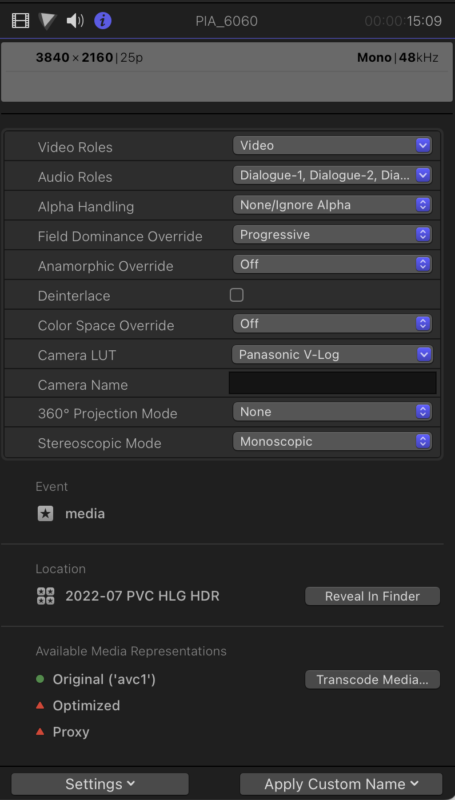
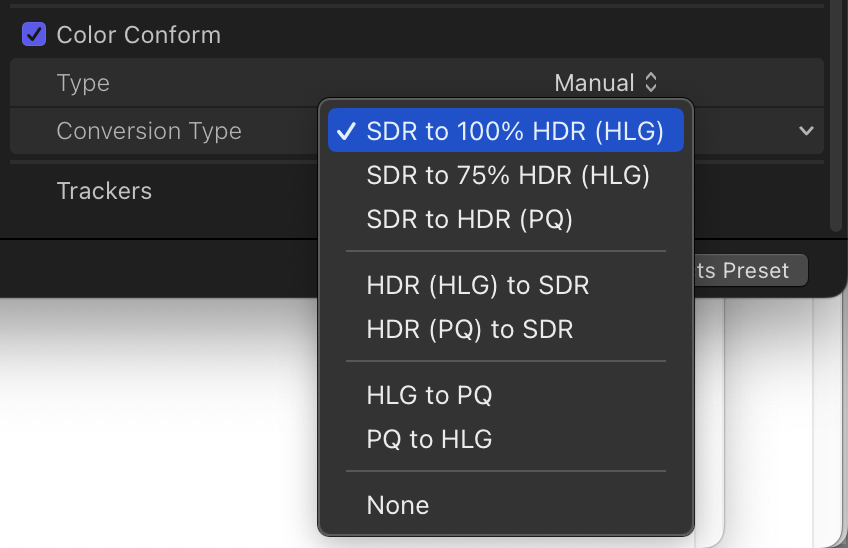
For non-Log SDR clips, utilize FCP 10.6.6’s new Color Conform setting to convert SDR to HDR at your desired brightness level. However, keep in mind that shooting in Log or HLG will provide a wider dynamic range.
Remember, HDR will enhance the brightness of your clips, so be prepared for a different visual experience. Focus on grading each clip consistently, and note that HLG’s video scopes will resemble SDR, so grade as if 100 IRE is the peak brightness.
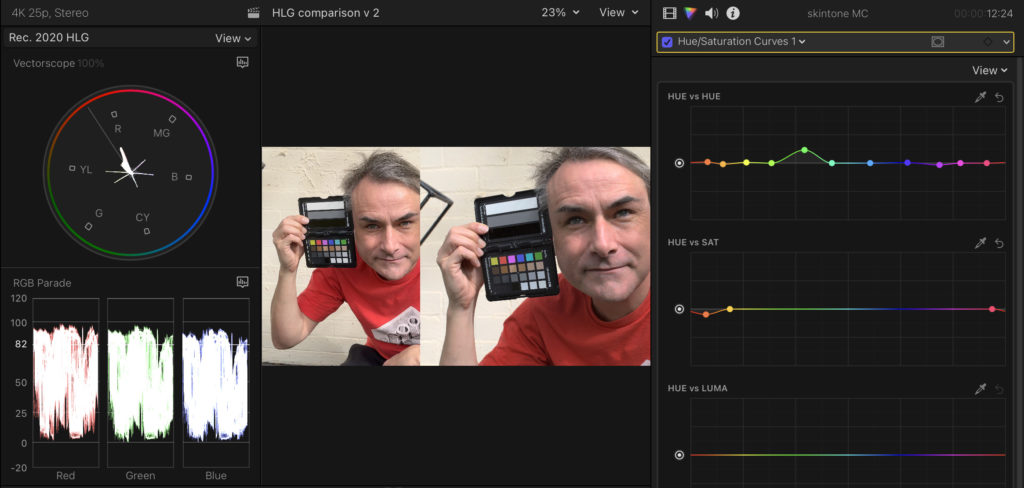
Connect an external non-HDR screen and seamlessly switch between monitors to grade for both SDR and HDR simultaneously. Pay special attention to skintones, as excessive shine may not look ideal. Be cautious, as a shot that appears great in HDR may look “milky” in SDR. Use a Luma curve to correct it and ensure it looks good on both SDR and HDR displays. (Remember, we’re aiming for “pretty good” here, not perfection.)
Next, export your project with the Dolby Vision setting, now conveniently built-in, and just as quick as H.264 on newer Macs. Finally, upload to Vimeo and/or YouTube and wait for HDR processing to complete. Vimeo typically completes this process within minutes, while YouTube may take a bit longer. Your video will look fantastic on HDR-capable displays, but SDR displays on YouTube may experience desaturation and potentially more contrast.
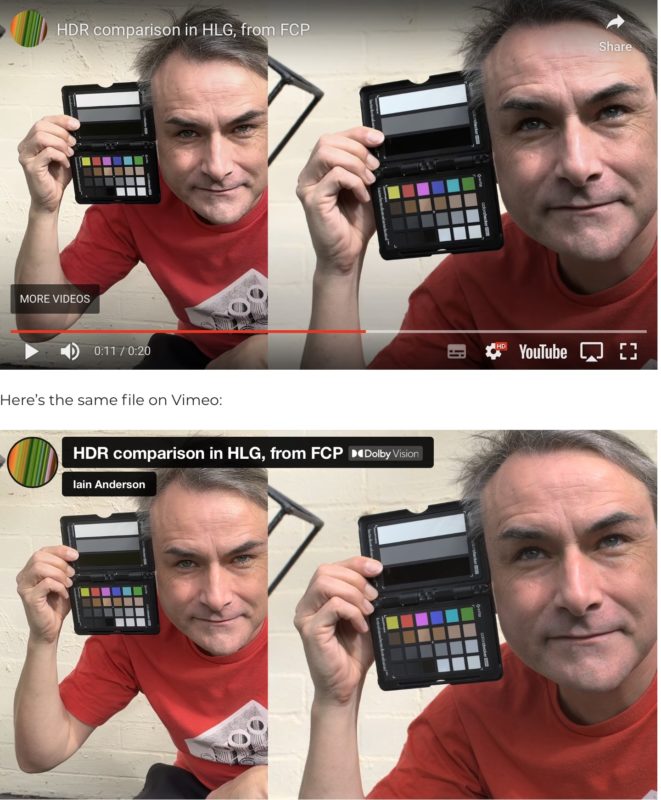
There’s a crucial distinction between Vimeo and YouTube. Vimeo directly sends the HDR file to viewers, allowing the operating system to handle any necessary conversions, resulting in a great viewing experience across all devices. On the other hand, YouTube only delivers HDR content to HDR screens and provides its own SDR downconversion for SDR screens, which may not be as optimal.
Conclusion
Although transitioning to HDR may seem like a step back in terms of color accuracy, there are advantages. HDR color tags are more standardized and leave less room for interpretation compared to SDR color tags. However, YouTube’s subpar SDR conversions for most viewers still present a challenge. Despite this, if you’re using a modern MacBook Pro, editing in Final Cut Pro, and uploading for web delivery, you can embrace HDR and captivate a portion of your audience with its enhanced brightness and vibrancy. Each platform handles HDR differently, so extensive testing is necessary to assess its usability. Currently, Vimeo outperforms YouTube in this regard.
Is it all worth it? Perhaps. Many clients appreciate the added brightness and vibrancy over color consistency. Upload a few test videos and see if they notice. If their response is positive, you may have found a winning formula. It’s easier to achieve success if you don’t show them an SDR edit first, as their expectations will already be set.
If you’re ready to dive into HDR, the easiest approach is to shoot in HDR with your cameras, perform simple grading, and reach a satisfactory result. Mixing SDR and HDR or up-converting subpar footage may lead to complications. Keep in mind that the situation outside of FCP is still challenging. However, if your experiment fails, it’s relatively simple to create SDR outputs from HDR assets, providing a fallback option.
HDR may not be easy for everyone yet, but it’s a frontier worth exploring. If your equipment is capable, embrace this new era that is rapidly approaching. Let’s hope HDR becomes more accessible to professionals soon, as you don’t want your clients to rely solely on their phones for all their shooting needs.

Other Articles
Create the Look of Natural Light with LED Screens and Projection Panels
7 Common and Avoidable Continuity Errors