Resolve 14.1 and 14.2: Exciting New Features and Improvements
Since the release of Resolve 14, we’ve been eagerly exploring all the amazing features in the latest version of the software. We’ve covered a lot of ground, but while we were busy writing about all the new features in 14, the Resolve engineers were working their magic to bring us even more with 14.1 and 14.2. Below, you’ll find a list of all the updated and added features, but let’s focus on a few that have really caught our attention.
Scopes on the Edit Page
One feature I really missed when I switched from Premiere Pro was the ability to view an RGB parade on the edit page. In Resolve, you had to switch to the color page to check the scopes, but now, with 14.1 and 14.2, you can open the scopes directly on the edit page. Simply select Workspace > Video Scopes > On.

Alternatively, you can press Ctrl+Shift+W to bring up the scopes.
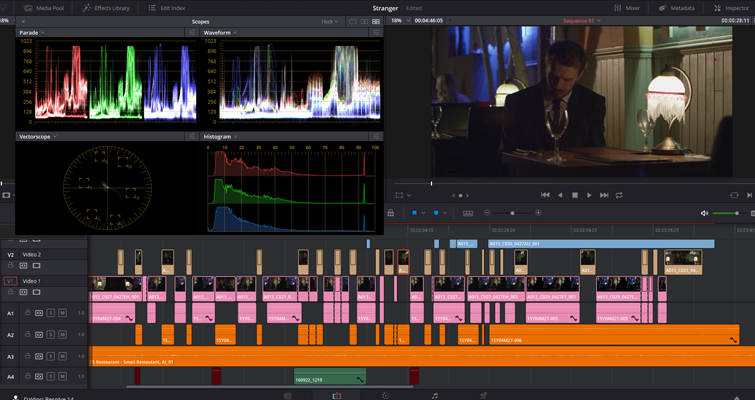
My only complaint is that I wish the scopes would open in the source monitor instead of as a floating panel.
Title Rendering
The title generator in Resolve 14 wasn’t the best for creative use. It was clunky, slow, and cumbersome. However, with 14.1 and 14.2, the rendering quality of the text has improved. Some users had concerns about text not looking sharp or having excessive luminance, but the developers have addressed these issues.

Smart Cache
Resolve’s cache settings have always been great, but now they’re even smarter. In 14.1, you can customize the render cache to include or exclude transitions and overlays, or even exclude an entire track.
To enable the smart cache, go to the menu bar and select Playback > Render Cache > User.

Next, go to the project settings on the right-hand side of the UI. Scroll down to Optimized Media and Render Cache, and check the boxes for “Automatically cache transitions in User Mode” and “Automatically cache composites in User Mode.” Don’t forget to hit save.

Now, when you’re back in the timeline, right-click on the track settings area and select “Exclude track from caching.”

These are just a few of the exciting new features that editors new to Resolve will love. But there’s so much more to explore, including a long list of new features and performance improvements. (You can find the full list from Blackmagic.)
In 14.1
- Added support for a new Project Server application to manage a local PostgreSQL server on macOS and Windows.
- Added support for presets for User Preferences.
- Added ability to simultaneously generate cache files for multiple cache points on a clip.
- Added ability to enable/disable caching of transitions in User Mode in Project Settings.
- Added ability to enable/disable caching of composites in User Mode in Project Settings.
- Added ability to retain the cache when moving clips with speed changes applied.
- Added support for excluding individual tracks from sequence cache in User mode.
- Added support for applying individual color attributes when dragging nodes from the Display Node Graph window.
- Added support for a zoom slider in the Display Node Graph window.
- Added support for accessing both the clip and the timeline node graph for a Still in the Display Node Graph window.
- Addressed an issue where right-clicking on a wiped still and selecting apply grade would not work.
- Added an option in the panel settings to switch between classic DaVinci and vectorscope trackball alignment.
- Added support for displaying video scopes on the Edit page.
- Improved title text rendering quality.
- Improved playback and rendering performance on the Radeon Pro WX 9100 GPU.
- Added support for RED IPP2 color processing.
- Added support for decompression and debayer options for Red Rocket cards.
- Added initial Linked Group support for audio tracks.
- Added the ability to drag and drop .drp project files into the Project Manager.
- Added support for a project setting to switch track metering between source and post-fader.
- Added the ability to update the track color rnrn- Multiple selected tracks on the Fairlight page can now be easily managed.
– Surround sound audio channels are now included in the downmix to stereo buses and monitors, enhancing the audio experience.
– A Project Setting has been added to automatically apply convergence to windows and effects in 3D stereoscopic projects, making the editing process more efficient.
– Groups are now supported in the Color page on collaborative projects, allowing for better organization and collaboration.
– Generating and rediscovering optimized media is now possible in collaborative projects, improving workflow and performance.
– Audio codec information can now be viewed in the Metadata widget, providing more detailed information about the audio files.
– GoPro CineForm is now supported as a caching and optimized media format, offering more flexibility in media management.
– Higher resolution DNxHR formats for MXF-based Fusion Connect workflows are now supported, allowing for better quality and resolution.
– The ResolveFX Warper is now GPU-accelerated, resulting in faster and smoother performance.
– The bus section in the Fairlight page meters is now scrollable, making it easier to navigate and monitor audio levels.
– Enhanced AC-3 audio can now be decoded on macOS and Windows, ensuring better audio quality.
– The viewer in the Fairlight page has been improved for better performance and usability.
– The behavior and interactivity of the timeline and track index in the Fairlight page have been enhanced, making editing more intuitive.
– 2D scrolling is now supported on the Fairlight page, allowing for easier navigation and editing.
– Source audio clips at any sample rate are now supported, providing more flexibility in audio editing.
– Dolby Vision trim is now supported on compound clips and Fusion Connect clips, offering more control over the visual effects.
– Audio-only insert to a tape deck is now possible, expanding the capabilities of audio editing.
– Video and audio, or video only, can now be captured from a tape deck, making it easier to import media.
– The issue of audio and video being out of sync when capturing from a tape deck has been addressed, ensuring accurate synchronization.
– An incorrect frame would sometimes be inserted when performing an assemble edit on a tape deck, but this issue has been resolved.
– Recording microphone input on some tracks would not persist the recorded clip, but this issue has been fixed.
– The length of a duration marker can now be modified on the Fairlight page, providing more control over the editing process.
– Deleting a bus that is being monitored would result in incorrect control room behavior, but this issue has been resolved.
– Audio FX in a project would not be persisted if the Audio FX was not installed, but this issue has been addressed.
– Moving or pasting clips in the Fairlight page would sometimes remove the associated transitions, but this issue has been fixed.
– Assigning an offline reference clip to a timeline would result in loss of audio, but this issue has been resolved.
– Switching timelines would sometimes result in loss of audio, but this issue has been addressed.
– Dynamics would not apply evenly across stereo and 5.1 tracks, but this issue has been fixed.
– Unintended audio fades would sometimes be applied, but this issue has been resolved.
– There was sometimes a change in audio level when playing back on the Edit and Fairlight page, but this issue has been addressed.
– Duplicating a timeline with layers would result in additional layers, but this issue has been resolved.
– Layers inside a compound clip would not play the correct audio, but this issue has been fixed.
– Moving an audio clip in subframe increments would not update waveform positions, but this issue has been addressed.
– Playback of nested timeline clips would not honor the mute state of the track, but this issue has been resolved.
– The track volume slider in the Inspector would sometimes be disabled, but this issue has been fixed.
– Alt/Option + click can now be used to switch multicam angles, providing a more efficient editing workflow.
– Trimming a freeze frame clip would sometimes crash, but this issue has been resolved.
– Video-only clips could sometimes not be dragged from the source viewer, but this issue has been fixed.
– Flags and markers from existing projects would not be loaded correctly, but this issue has been addressed.
– A marker name change would sometimes not get saved, but this issue has been resolved.
– Importing FCPXML files with a subframe video edit would sometimes cause a crash, but this issue has been fixed.
– Exporting an XML from some timelines would cause a crash, but this issue has been addressed.
– Rendering a clip with synced audio in Individual Clips mode would not render the synced audio, but this issue has been resolved.
– “Render at source resolution” would not apply ResolveFX Face Refinement correctly, but this issue has been fixed.
– Fusion Connect clips would be rendered without temporal noise reduction applied, but this issue has been addressed.
– Saving a project would fail in certain collaboration scenarios, but this issue has been resolved.
– Saving a collaboration project when overwriting a clip in certain scenarios would cause an issue, but this has been addressed.
– Switching clips on the Color page in collaboration would sometimes not acquire a lock, but this issue has been fixed.
– Various issues with tracking of Power Windows when working in Cinemascope have been addressed, ensuring accurate tracking.
– Various issues with tracking of Power Windows when using Center crop with no resizing have been resolved, improving accuracy.
– Stabilization would sometimes not work with Edit and Input sizing applied, but this issue has been fixed.
– The tracking would be applied incorrectly when changing the timeline resolution or the clip pixel aspect ratio, but this issue has been addressed.
– The FX tracker would sometimes not work correctly when Input or Edit sizing was applied, but this issue has been resolved.
– Issues with applying 3D LUTs when using Metal as the GPU processing mode have been addressed, ensuring accurate color grading.
– Some OpenFX plugins would cause flashing of grades, but this issue has been resolved.
– A crash would occur in certain scenarios when switching to the Key Palette on a matte node, but this issue has been fixed.
– Playback performance of large projects in the Color page has been improved, ensuring smooth and efficient editing.
– Render at source resolution would not apply stabilization, but this issue has been addressed.
– Some memories would show up as blank when reloading a project from the disk database, but this issue has been resolved.
– A crash would occur when opening some stereo projects upgraded from DaVinci Resolve 12.5.6, but this issue has been fixed.
– Importing some DaVinci Resolve 12.5 projects would cause an issue, but this has been addressed.
– EasyDCP renders would cause a crash on macOS 10.13 High Sierra, but this issue has been resolved.
– The easyDCP KDM generation would not honor the validity dates specified, but this issue has been fixed.
– Decoding certain long QuickTime clips would repeat a frame, but this issue has been addressed.
– QuickTime ProRes 4444 clips would sometimes lose the alpha channel during playback, but this issue has been resolved.
– A crash would occur when trimming and copying AIFF clips using Media Management, but this issue has been fixed.
– Decoding HEVC clips at 2048×858 would sometimes result in artifacts, but this issue has been addressed.
– Certain MXF clips would show incorrect duration, but this issue has been resolved.
– Decoding certain Sony clips in an ACEScc workflow would cause an issue, but this has been addressed.
– Performance issues when media managing a large number of clips from the same source folder have been improved.
– Floating Media Pool windows would not get updated correctly when performing an undo, but this issue has been resolved.
– Resizing the Media Pool would sometimes result in a crash, but this issue has been fixed.
– A clip with a split edit would not be stored correctly in the Media Pool, but this issue has been addressed.
– Some UI issues when running Resolve in full screen mode on macOS have been fixed, ensuring a smooth user experience.
– A crash would occur when opening the Effects Library when duplicate plugins are installed, but this issue has been resolved.
– Connectivity issues with the DaVinci Resolve Advanced panel on Linux have been addressed, ensuring seamless integration.
– Large projects would sometimes hang during load, but this issue has been resolved.
– General performance and stability improvements have been made, ensuring a smoother and more reliable editing experience.In 14.2:
– The DeckLink 8K Pro monitoring modes are now supported, providing more options for monitoring.
– Audio-only AAF timelines can now be imported, expanding the compatibility of audio projects.
– Audio handles can now be rendered in ProTools round trip mode, improving the audio editing workflow.
– Audio playback is now supported when performing dynamic trimming, allowing for better audio editing.
– Final Cut Pro 10.4 XML can now be imported and exported, making it easier to collaborate with Final Cut Pro users.
– Gallery Stills can now be automatically named using user-defined tags, streamlining the organization of still images.
– 16 and 18 fps timeline frame rates are now supported, offering more flexibility in project settings.
– 95.905 fps timeline frame rate is now supported, allowing for more precise timing in projects.
– More fine-grained preferences for Performance Mode have been added, providing more control over performance settings.
– Keyframes in the Fairlight page have been improved for better control and precision.
– Multiple DeckLink SDI devices with unique names- Added support for Enable 2D Timeline Scroll on the Fairlight page.
– Added support for context menus for markers in the Fairlight page.
– Added support for automatic creation of a timeline when dragging in an audio clip in the Fairlight page.
– Addressed issues with acquiring and releasing the lock for a bin in a collaboration project.
– Addressed an issue where network connectivity issues could cause unexpected results in a collaboration project.
– Addressed an issue where a blank node graph would sometimes be displayed when switching between clips in collaboration mode.
– Addressed an issue where two users could sometimes load a non-collaboration project in write mode without a warning.
– Addressed an issue where “Update Timecode from Audio using LTC” would not work on clips starting with blank audio.
– Addressed an issue where retiming an audio clip would sometimes result in audio glitches.
– Addressed an issue where unlinking linked audio groups with the Pan dialog open would cause a crash.
– Addressed an issue where starting or stopping playback would sometimes cause a momentary glitch in the audio on the Fairlight page.
– Addressed multiple issues with fader behavior for direct track outputs in the Fairlight track mixer.
– Addressed an issue where the Fairlight timeline would sometimes show an incorrect number of audio tracks.
– Addressed an issue where the Fairlight control room widget would sometimes become invisible when resetting a dual-screen UI layout.
– Addressed an issue where JKL playback would not honor the looped playback state on the Fairlight page.
– Addressed an issue where moving an audio clip would not refresh the keyframe navigation buttons on the Fairlight inspector.
– Addressed an issue where some Fairlight dial widgets would not reset their values correctly on double-click.
– Addressed an issue where audio EQ band adjustments might be incorrectly saved.
– Addressed an issue where stopping playback would continue audio output for a few frames on the Edit page.
– Addressed an issue where LTC timecode output over SDI would not work when playing back on the Edit page.
– Addressed an issue where the Mute status would not be reflected correctly in the Edit page on a track with automation.
– Addressed an issue with titles where using certain fonts would result in cropped glyphs.
– Addressed an issue where bypassing color grades would bypass OpenFX applied on the Edit page.
– Addressed an issue where deleting a clip with an OpenFX transition would sometimes crash.
– Addressed a crash when switching multicam angles if the viewer was in source mode.
– Addressed an issue where reconforming multicam clips from a bin would not retain the original angle information.
– Addressed an issue where performing a blade operation on asymmetric linked edits would result in incorrect linking.
– Addressed an issue where previewing compound clips and timelines in the source viewer would activate the timeline audio meters.
– Addressed an issue where previewing video-only clips in the source viewer would sometimes be slow on the Edit page.
– Addressed an issue where importing older projects using a Sony IDT in an ACES workflow would sometimes cause a crash.
– Addressed an issue with audio playback when applying clip filters on the Color page.
– Addressed an issue where Color Tracing Power Windows from proxy files would result in incorrect window positions.
– Addressed an issue where copying grades between clips would unnecessarily invalidate the clip source cache.
– Addressed an issue where bypassing color grades on speed changed clips would disable the optical flow or frame blending.
– Addressed an issue with incorrect results when stabilizing multiple edits from the same source.
– Addressed an issue where switching databases would sometimes incorrectly hide the second screen in a dual screen monitor layout.
– Addressed an issue where GoPro CineForm clips would decode with a watermark applied on Linux.
– Addressed an issue with decoding some Sony XAVC-I clips.
– Addressed an issue with incorrect cropping for certain QuickTime ARRI clips.
– Addressed an issue with color shifts when decoding certain Panasonic AVC-Intra clips.
– Addressed an issue where the stereo audio format of some MXF clips was not recognized correctly.
– Addressed an issue with reading drop-frame timecodes for DPX clips.
– Addressed an issue when decoding some QuickTime clips with large timecode values.
– Addressed an issue with color shifts when rendering stereoscopic 3D clips in side-by-side mode using H.264.
– General performance and stability improvements.Lewis McGregor is a certified BlackMagic Design DaVinci Resolve Trainer.
Looking for more info on Resolve? Check out these articles.
– How To Create A Sub Mix In DaVinci Resolve 14 – Video Tutorial
– Resolve 14’s Best Editing Features For The Online Content Creator
– What You Need to Know About Resolve 14’s Latest Media Page
– How to Create a Realistic Lens Flare in DaVinci Resolve
– Working with DaVinci Resolve 14’s Powerful Face Refinement Plug-in

Other Articles

Major VFX Houses: Unveiling Their Locations